

Quick summary:
This case study traces a silent UTC-vs-local offset that misfiled late-evening events one calendar day forward in an Azure Synapse and PySpark pipeline. It covers the four shapes a timezone mismatch takes, how a day-by-day reconciliation exposed the boundary shift, six PySpark and Synapse patterns that fix it, how conversion differs across dedicated SQL pools, serverless SQL pools, Spark, and Mapping Data Flow, and how to validate the fix until per-day deltas reach zero.
Your nightly pipeline runs green, your row counts match, your monthly totals look right. Yet a single day’s numbers refuse to reconcile with the source system, always off by the same few hours. The problem is almost certainly an Azure Synapse timezone conversion gap. The rows are all there, counted under the wrong day. Our team at ScriptsHub Technologies traced these symptoms when a daily attribution report disagreed with the operational source by a few percent daily. Nothing errored, nothing alerted. This guide shows how that offset corrupts date-grained reporting across Azure Synapse and PySpark, and how deliberate timezone conversion keeps numbers correct through daylight saving and mixed source zones.
Azure Synapse timezone conversion means storing every timestamp in UTC and converting to the business zone only at the presentation layer, with from_utc_timestamp in PySpark or the double AT TIME ZONE operator in Synapse SQL. A raw-UTC offset otherwise files late-evening events under the wrong calendar day, so daily reports miss the source while monthly totals match. Validate day by day until the per-day deltas hit zero.
The difference between a report you can trust and one that is quietly wrong by a day usually isn’t a missing record – it’s an undeclared assumption about which timezone a timestamp was already in.
What a UTC vs. Local Time Mismatch Actually Is
A UTC vs. local time mismatch occurs when a timestamp is grouped or stored in a different time zone than the one in which it was recorded. As a result, late-evening records can fall on the wrong calendar day. A timestamp is only meaningful when its time zone is known. Problems arise when two systems assume different time zones and neither explicitly declares them. The failure modes fall into four shapes.
First, naive local time: the source emits a wall-clock value like 2024-03-09 21:00 with no offset; Spark and Synapse store timestamps as UTC instants, so they read that 9 PM local event as already 9 PM UTC. Second, correct UTC but wrong grouping: the data really is stored in UTC, yet the report derives the day from the raw UTC date instead of converting first, so events near midnight land on the wrong day. Third, the daylight-saving shift: a fixed offset is hardcoded instead of a named zone, so for half the year the conversion is silently an hour off. Fourth, display-only conversion: Spark’s show() renders one zone while the value written to the warehouse is another, so the value you eyeball differs from the one you shipped.
Why Timezone Bugs Stay Hidden in Daily Reporting
Timezone bugs stay hidden because they change which day a record counts toward, not how many records exist, so totals still reconcile and no job fails. Errors arrive in two grades: loud failures, where a cast fails or a date-key join returns nothing and the job turns red; and silent failures, where the pipeline succeeds and writes plausible numbers that sum to roughly the right monthly figure. The silent kind surfaces only when someone checks a single day against the source and finds it short.
Silent misattribution bypasses monitoring entirely: because the totals net out over a long window, a missing timezone conversion can sit in production for weeks before someone questions why yesterday doesn’t match.
How Does a UTC Offset Corrupt Daily Reports?
A UTC offset corrupts daily reports by pushing late-evening records across midnight: stored as a UTC instant and grouped on the UTC date, a 9 PM local event counts on the next day. Event records land in ADLS Gen2 as Parquet, transform in a PySpark notebook, and feed daily aggregates into a Synapse SQL pool for a Power BI attribution report.
One morning a stakeholder notices the daily figures don’t match the source. Not wildly off: short some days, long the next. Pipeline green, monthly totals correct, no alert. The source emitted event times in Eastern local time, the Spark layer treated the stored instant as UTC, and the daily aggregate grouped on the UTC date. An event at 9:00 PM Eastern (EST is UTC-5) is 2:00 AM the next day in UTC. Across a month the counts balanced out, which is why nobody caught it until someone checked a day.

The same instant lands on two different calendar days: a 9 PM Eastern event is already 2 AM the next day in UTC.
How We Diagnosed the Azure Synapse Timezone Conversion Failure
The fastest way to confirm a timezone-handling bug is a same-day reconciliation: pull daily counts from the source and compare them day by day against the Synapse output. The signature is unmistakable: day over day, the deltas alternate sign and net to nearly zero, running largest on heavy-evening days. That pattern marks a date-boundary shift, with every row still present.
The root cause wasn’t a bug in anyone’s code. Two undocumented assumptions did the damage: nobody recorded the source’s zone, and the report computed the day in UTC even though the business defines it locally. A hardcoded offset made it worse, so rare manual cross-checks landed in the wrong half of the daylight-saving year and still looked right.
How to Fix Azure Synapse Timezone Conversion in PySpark Pipelines
To fix Azure Synapse timezone conversion, store every timestamp in UTC. Convert it to the business time zone only at read time. Use from_utc_timestamp in PySpark or the double AT TIME ZONE operator in Synapse SQL. The discipline treats each timestamp’s zone as something you declare deliberately, and it rests on three principles.
Capture in UTC at ingestion
Decide the canonical storage zone once, and make it UTC. If a source emits naive local time, convert it at the door using that source’s known zone. Because Parquet stores timestamps as zone-less UTC instants, getting this right means every consumer reads the same moment.
Convert explicitly, never implicitly
Make the Spark session timezone deterministic and perform every zone change with an explicit function call, so behavior doesn’t depend on where the cluster runs.
Store UTC, present local
Keep the warehouse in UTC and apply timezone conversion to the business zone only at the presentation layer: the moment you compute a report date, group by day, or display a value. This store-UTC / present-local rule prevents date-boundary misattribution.
PySpark and Synapse Patterns to Convert UTC to Local Time
Pattern 1 – Compute the report date in the business zone
The misattribution comes from extracting the date in UTC; convert UTC to local time first, then take the date.
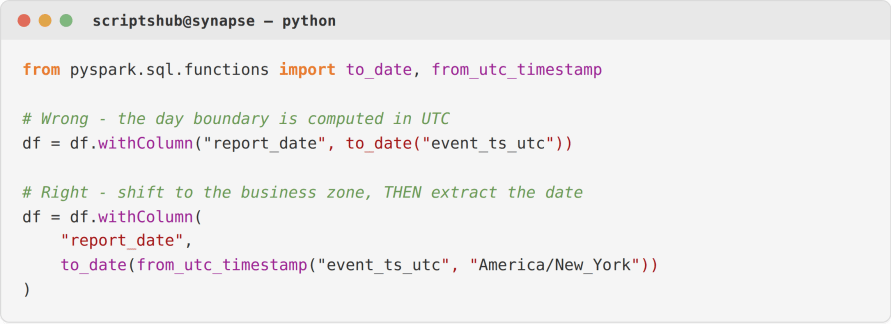
Why this works: from_utc_timestamp re-expresses the same instant in the target zone before the date is taken, so a 9 PM Eastern event is dated to its real local day instead of being pushed across midnight by the UTC offset.
Pattern 2 – Declare the source zone at ingestion
If the source emits naive local timestamps, convert them to UTC immediately so everything downstream shares one instant.
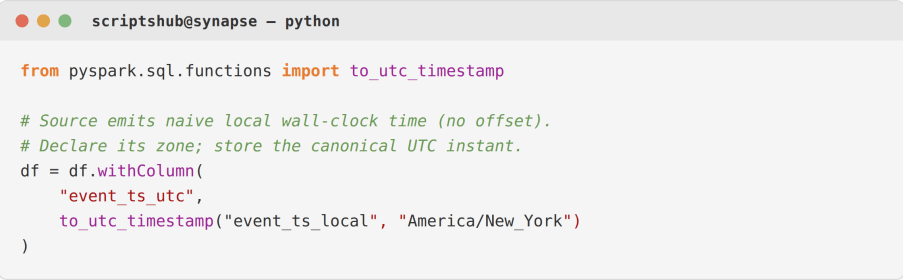
Why this works:to_utc_timestamp interprets the wall-clock value as the named zone and returns the corresponding UTC instant. Using the IANA zone name (America/New_York, not a fixed offset) means daylight saving is applied automatically year-round.
Pattern 3 – Make the session timezone deterministic
Pin the Spark SQL session timezone so date extraction and string rendering don’t vary by cluster region.

When to use which:pinning the session zone makes behavior reproducible across clusters. It handles determinism only, so you still convert to the business zone explicitly before deriving any report date.
Pattern 4 – Convert at the Synapse layer with AT TIME ZONE
When the report is served from a Synapse SQL pool, which always operates in UTC, convert at query time instead of baking an offset into stored data.
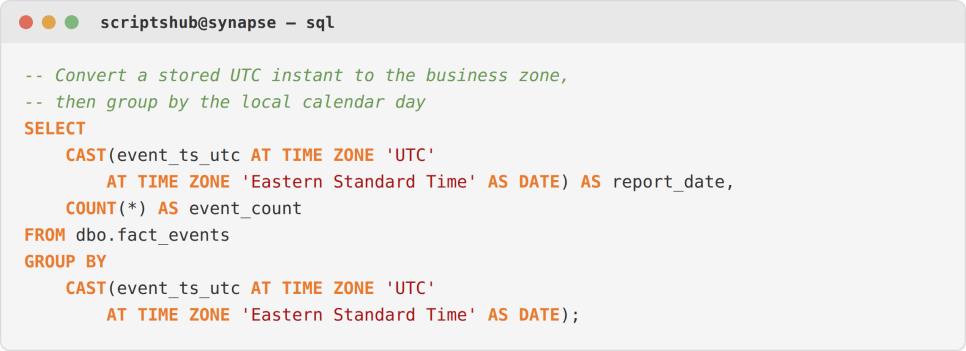
Why this works: the double AT TIME ZONE first tags the value as UTC, then shifts it to the business zone, with daylight saving handled by the Windows zone database – keeping the warehouse canonical while the report reads in local terms.
Pattern 5 – Boundary-aware validation
Prove the fix with a day-by-day reconciliation against the source, using the same business-local day definition on both sides. The bug is gone once the per-day deltas collapse to zero.
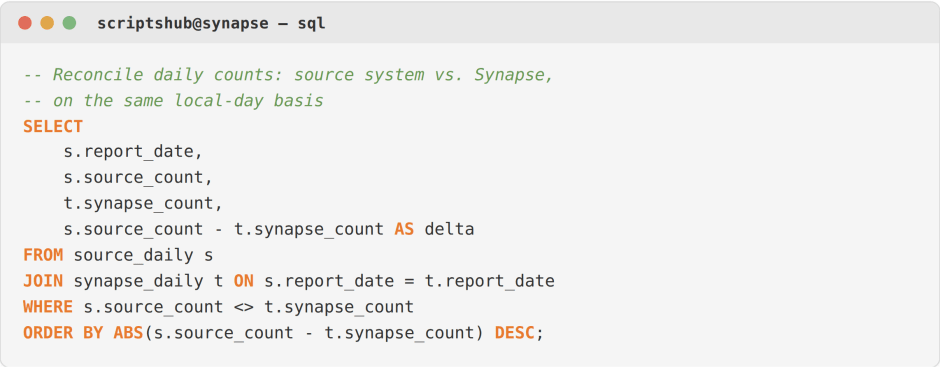
Pattern 6 – A source-timezone metadata table
Keep a control table of each source’s emitted zone and read it at runtime, so onboarding a new-zone source only takes a new row.
Timezone Conversion Across Synapse Engines: Dedicated, Serverless, and Spark
Azure Synapse defaults to UTC on all three compute engines (dedicated SQL pool, serverless SQL pool, and Spark), regardless of region, per Microsoft’s documentation. So the conversion has to be explicit, and the mechanism differs by engine.
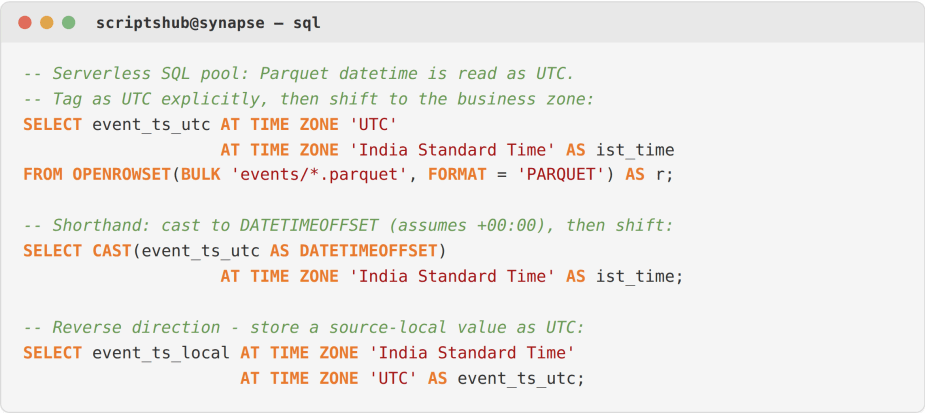
A dedicated SQL pool can’t change its server time zone. Instead, use the double AT TIME ZONE operator from Pattern 4. Reversing the two zones stores a source-local value as UTC. A serverless SQL pool reads Parquet timestamps as UTC. Tag the value with AT TIME ZONE 'UTC' or cast it to DATETIMEOFFSET, then convert it to the business time zone.
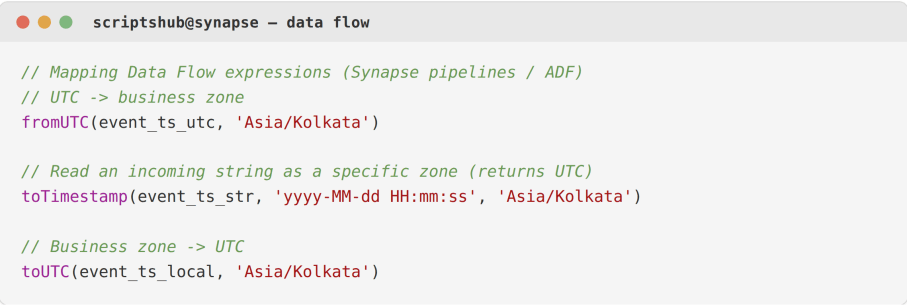
Spark keeps from_utc_timestamp and to_utc_timestamp. A Mapping Data Flow in Synapse pipelines or Azure Data Factory converts with expressions: fromUTC() to leave UTC, toUTC() to enter it, and toTimestamp() with a zone to read a string as local. One caveat spans all four engines. T-SQL expects Windows zone names while Spark expects IANA names, so the same zone reads differently by engine. The IANA time zone database tracks more than 400 time zones. As IANA notes, it is “updated periodically to reflect changes made by political bodies.” That’s why a named time zone is always a better choice than a hardcoded offset.

Serverless SQL pool – three equivalent conversions:
Mapping Data Flow – expression syntax:
If your Synapse and source-system numbers won’t reconcile after repeated re-runs, this kind of timezone-handling gap is one of the first things to rule out. It’s the sort of quiet, high-stakes issue our team at ScriptsHub Technologies exists to find. You can see how we approach data engineering work – and browse related case studies – at scriptshub.net.
How to Validate Timezone Conversion Day by Day
To validate Azure Synapse timezone conversion, reconcile daily counts against the source using the same local-day definition on both sides. The fix is confirmed once the per-day deltas hit zero. A matching monthly total proves little because boundary shifts cancel each other out while misattributed records remain one day off. When the per-day deltas collapse to zero on the heavy-evening days that used to swing most, the offset is gone.
Warning: Setting the Spark session timezone to UTC feels like a fix, but it only makes behavior consistent while the attribution stays wrong. If your report still derives the day from the UTC date, every late-evening local event keeps landing on the wrong day. You must apply timezone conversion to the business zone before extracting the date; the session setting alone won’t do it.

What Changes After You Fix Timezone Conversion?
After the store-UTC / present-local discipline was in place, the daily attribution numbers reconciled with the source to the row, and per-day gaps on heavy-evening days fell to zero. The timezone logic now lives in two well-defined places: ingestion and presentation. The table below shows the change.

Bottom Line
The reporting bugs that cost the most rarely crash anything. They quietly add up to almost the right answer. A missing conversion from stored UTC to the business time zone is the textbook case: monthly totals look right while daily numbers drift. Store one canonical zone, convert at the edges, and validate by the day.
Struggling to reconcile date-grained numbers between Azure Synapse and your source systems?
ScriptsHub Technologies builds timezone-correct, reconciliation-tested data pipelines on Azure – Synapse, ADLS Gen2, PySpark, and Power BI. See how we work at scriptshub.net.
Key Takeaways for Data Engineers
Reliability – records land on the correct business day, so daily numbers reconcile with the source instead of drifting.
Maintainability – a store-UTC / present-local discipline concentrates timezone conversion in two defined places that are easy to audit and change.
Observability – day-by-day reconciliation turns a silent offset into a measurable delta.
Pattern recognition – if a source emits local time or your day is defined locally, assume a boundary bug is possible and validate at the daily grain.
Frequently Asked Questions
Q. What causes UTC vs. local time bugs in Azure Synapse?
Synapse SQL pools always operate in UTC. A report can derive the day from a raw UTC timestamp. If it does so without first converting the timestamp to the business time zone, late-evening events shift to the wrong calendar day.
Q. How do I convert UTC to local time in Azure Synapse?
Use the double AT TIME ZONE pattern: tag the value as ‘UTC’, then convert to a Windows zone like ‘Eastern Standard Time’. This timezone conversion applies daylight saving automatically before you group by day.
Q. Which PySpark function handles timezone conversion correctly?
Use from_utc_timestamp to render a UTC instant in a named zone before extracting the date, and to_utc_timestamp to store naive local time as UTC. Both apply IANA-zone daylight-saving rules.
Q. Why do my monthly totals match but daily numbers don’t?
Because a timezone offset moves records to an adjacent day without deleting them. Monthly totals net the shifts out, so only day-by-day reconciliation exposes the missing conversion.
Q. Does Azure Synapse use UTC by default?
Yes. Azure Synapse defaults to UTC across dedicated SQL pools, serverless SQL pools, and Spark, regardless of region. Any conversion to a local zone must be explicit – the platform never infers it.


