

The Demo That Worked – Until Real Users Showed Up
Why Stateless MCP Fails in Production
Each MCP tool call reaches your server as a standalone JSON-RPC message containing the tool name, parameters, and transport metadata. The server processes it, returns structured results, and resets. No memory of the previous call persists. No authentication context carries over.
What Breaks in Multi-Step Workflows
For a single data lookup, stateless MCP works fine. But enterprise workflows are multi-step. A sales manager asks the copilot to pull Q3 revenue, then drills into regional breakdowns. Because the MCP server is stateless, the second tool call has no idea what filters were applied. It starts from scratch – re-authenticating, requerying, and losing all conversational context.

In our client deployment, we measured the impact of this stateless behavior: the copilot was making 12-15 redundant authentication calls per user workflow, average response latency was 2.3 seconds (mostly auth overhead), and only 34% of multi-step workflows completed successfully. Users gave up before the assistant could finish what should have been a 30-second interaction.
The Fix: A Session State Architecture That Actually Works
To solve the session state problem in our MCP server, we needed three components working together: a session identifier that travels reliably with each JSON-RPC request, a storage layer that persists authentication and workflow context between consecutive tool calls, and lifecycle logic that handles session creation, retrieval, renewal, and expiration.

Here’s the session manager we deployed to production. The pattern is deliberately simple-complexity should live in your tool logic, not your session infrastructure.
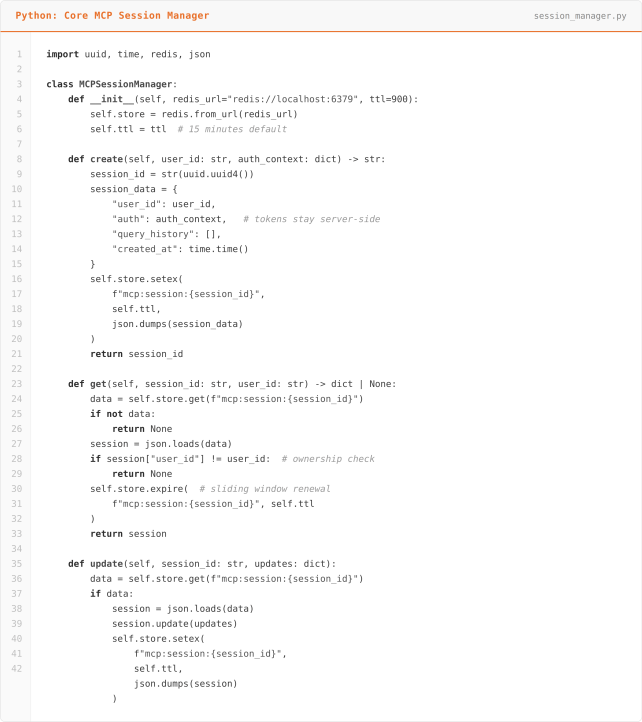
This code manages user login sessions by securely creating, storing, and updating temporary user information so an app can remember who someone is while they are using it.
Notice three critical design decisions in this MCP session state Architecture Implementation. First, authentication tokens never leave the server. The AI client receives only the opaque session ID – it has no access to credentials, downstream API keys, or OAuth tokens. This is essential for secure MCP deployments where the AI layer should not have direct access to user credentials. Second, the sliding TTL window renews the session on every access. This means active sessions stay alive as long as the user is engaged, while abandoned sessions expire after 15 minutes of inactivity. Third, the ownership check on every retrieval ensures that session IDs cannot be reused across different authenticated users – a critical safeguard against session hijacking in multi-tenant MCP environments.

This code handles user requests by recognizing whether someone is continuing a previous interaction or starting a new one, securely retrieving their saved context so the system can give consistent, personalized results across multiple queries.
The key insight here is that the MCP tool handler doesn’t care how the session is stored. Redis in production, an in-memory dictionary during development, JWT-based session tokens for lightweight serverless deployments – the interface stays identical. This separation of concerns allows you to start development with a simple Python dictionary. Then, when you move to production, you can migrate to Redis or DynamoDB without changing a single line in your tool handlers
The pattern works across any MCP server framework and any cloud platform, whether you’re deploying on AWS, Azure, or GCP.
MCP Session Security: Where Most Implementations Go Wrong
Session state management in MCP servers is a security surface, not a convenience feature. In production MCP deployments across healthcare, financial services, and enterprise environments, we’ve seen three categories of mistakes that create real vulnerabilities in AI copilot systems.
Leaking auth tokens to the AI client: Some MCP server implementations return JWT tokens or API keys alongside the session ID, letting the AI model (and potentially the end user) see downstream credentials. This is dangerous because it violates the principle of least privilege: the AI layer should orchestrate tool calls, not hold the keys to your data warehouse. In our session manager pattern, the AI client only ever sees an opaque UUID session identifier. The actual OAuth tokens, API keys, and database credentials remain server-side in Redis, never exposed through the MCP response payload.
Missing ownership validation: If your MCP session lookup only checks whether a session ID exists – without verifying that the requesting user owns that session – you have a session hijacking vulnerability. In a multi-user copilot deployment, this means User A could potentially access User B’s authenticated session by guessing or intercepting a UUID. Our implementation solves this with a mandatory user_id comparison on every get() call. The session data includes the creating user’s identity, and any mismatch returns None, forcing re-authentication.
No event-driven invalidation: TTL-based session expiration alone isn’t sufficient for enterprise MCP deployments.
The Results: Measured Production Impact
After deploying session state management to our healthcare client’s copilot, we measured the before and after over a four-week period with 15 active users executing an average of 40 workflows per day.

The most significant change wasn’t a technical metric – it was user behavior. Before session state, the sales team treated the copilot as a glorified search bar: one question, one answer, move on. After the fix, they started running genuine multi-step analytical workflows – the kind of interaction the system was designed for.
What We’d Tell You Before You Build This
Start with in-memory, but design for Redis from day one: Use a clean interface (like the SessionManager class above) so your tool handlers never reference the storage backend directly. We’ve migrated three clients from in-memory to Redis without touching application code because the abstraction was right from the start.
Log session lifecycle events obsessively: In production, you’ll need to debug why a specific session expired, why a user got a stale context, or why a workflow broke at step four. Structured logs for every create, retrieve, update, and expire event – with correlation IDs – have saved us hours on every engagement.
Don’t cache too much: It’s tempting to store full query result sets in the session. However, don’t. Instead, store summaries, filter states, and metadata – not raw data. Otherwise, large session payloads degrade Redis performance and create data freshness problems over time. If a user’s follow-up query needs the full prior result set, then re-query from the Gold layer – it should be fast enough if your data architecture is truly sound.
Plan for concurrent sessions: Real users have multiple browser tabs open. They switch between mobile and desktop. Your session design needs to handle a single user with three active sessions that shouldn’t interfere with each other. We key sessions on both user_id and a client-generated conversation_id to isolate parallel workflows.
Building MCP into Your Enterprise? Let’s Avoid the Expensive Mistakes.
At ScriptsHub Technologies, we’ve deployed production MCP servers for enterprise copilots across healthcare, financial services, and distribution. We place a strong emphasis on robust MCP session state management in every implementation.
Importantly, the MCP session state pattern described here is just one component of a broader production readiness framework. In addition, this framework encompasses authentication architecture, tool design, error handling, and observability.
We then deliver a prioritized implementation roadmap. No sales pitch – just engineering guidance from a team that’s shipped this in production.
→ Request your MCP Architecture Review: connect with us at info@scriptshub.net or visit www.scriptshub.net
Frequently Asked Question’s
1. Why do MCP servers fail in production but work in demos?
MCP servers are stateless by default – each tool call resets with no memory of previous interactions. Demo environments mask this because they test single-step workflows, while production users run multi-step workflows requiring persistent authentication and conversational context between calls.
2. What is MCP session state management and why does it matter?
MCP session state management persists authentication tokens, workflow context, and user identity across consecutive tool calls. Without it, every MCP request re-authenticates from scratch, causing redundant API calls, high latency, and broken multi-step workflows in enterprise AI copilot deployments.
3. How do you persist session state between MCP tool calls?
Use a session manager that stores authentication tokens and workflow context in Redis, keyed by an opaque session ID. The AI client receives only the session ID – never raw credentials. Sliding TTL windows keep active sessions alive while expiring abandoned ones automatically.
4. What are the biggest MCP session security mistakes in production?
Three critical mistakes: leaking OAuth tokens to the AI client layer, missing user ownership validation on session lookups enabling session hijacking, and relying solely on TTL expiration without event-driven invalidation when users change passwords or lose permissions.
5. Should MCP session state be stored in Redis or in-memory?
Start with in-memory during development, but design your session interface for Redis from day one. Use a clean abstraction layer so tool handlers never reference the storage backend directly – this lets you migrate to Redis or DynamoDB in production without changing application code.
6. How do you handle concurrent MCP sessions from the same user?
Key sessions on both user ID and a client-generated conversation ID to isolate parallel workflows. Real users open multiple browser tabs and switch between devices – each session must maintain independent context without interfering with other active sessions from the same user.
7. How does MCP session state improve AI copilot adoption rates?
In measured production deployments, session state management increased multi-step workflow completion from 34% to 91%, reduced response latency by over 70%, and increased average session depth from 1.3 to 4.7 tool calls – transforming copilots from single-query search bars into genuine analytical tools.


