

QUICK SUMMARY
A nightly Azure Data Factory pipeline ran green for months while silently corrupting three days of Synapse fact data after a third-party SaaS vendor renamed a column and changed a decimal type. Our team at ScriptsHub Technologies redesigned the pipeline around a three-layer drift-resilient architecture: schema-on-read landing in ADLS Gen2,
byName()with coalesced fallbacks in Mapping Data Flow, and metadata-driven schema contracts in Synapse – dropping mean-time-to-detect from days to minutes.
Three days of corrupted sales data – Friday’s batch through Sunday’s. Pipeline status: green. Row counts within tolerance. No alerts fired. The first warning came Tuesday morning when a stakeholder questioned why the top product category showed zero activity over the weekend.
This is Schema Drift in Azure Data Factory – an unannounced upstream schema change that ADF’s default settings cannot detect. Our team at ScriptsHub Technologies inherited this failure after a third-party SaaS vendor renamed a column, added two optional fields, and silently widened a decimal type. The pipeline kept running. The damage was done before anyone noticed.
What Causes Schema Drift in Azure Data Factory Pipelines?
Schema drift is any unannounced change to a source dataset’s structure that the pipeline did not expect. In ADF, drift takes five forms: additive (new columns), renaming (same meaning, new name – silent by default), type change (DECIMAL(10,2) widens or narrows), breaking (required column dropped), and semantic (name and type unchanged but values now mean something different – the most dangerous variant because no schema check will catch it).
ADF fails in two ways. Loud failures are easy – Copy Activity errors out, someone gets paged. Silent failures are the dangerous ones: the pipeline keeps running, writes wrong data downstream, and corruption surfaces only when someone questions a number.
Why this matters: Schema drift is inevitable wherever producers and consumers deploy independently. The question isn’t whether it will happen – it’s whether your pipeline is designed to notice.
Schema Drift in Azure Data Factory: A Pipeline That Ran Green but Reported Zeros
A retail analytics group engaged us to investigate a nightly ADF pipeline pulling transactional records from a SaaS REST API, landing them in ADLS Gen2 as Parquet, transforming through a Mapping Data Flow, and loading curated fact tables into Synapse Dedicated SQL Pool for Power BI.
The vendor shipped a Friday-afternoon release. Batches ran green Friday through Monday. On Tuesday morning, a stakeholder flagged that the top product category showed zero values for the weekend – three days of corrupted fact data in Synapse before anyone questioned a number.
The release had bundled three breaking changes: product_category renamed to category_name, two optional fields added (discount_reason, regional_tax_code), and sale_amount widened from DECIMAL(10,2) to DECIMAL(12,4). The pipeline’s hardcoded column projection silently dropped the renamed field, defaulting it to NULL, which downstream aggregations rolled up to “Unknown” – masking a schema problem as a data-entry problem.
Why Schema Drift in Azure Data Factory Breaks Pipelines Silently
The root cause wasn’t a bug – it was four common ADF design assumptions that are individually reasonable but collectively fragile: hardcoded column selection in the source projection, “Allow schema drift” disabled at source and sink (ADF’s default), no schema contract validation between expected and actual source schema, and no metadata reconciliation layer – nothing knew what the source was supposed to look like.
How to Handle Schema Drift in Azure Data Factory: A Three-Layer Design
We redesigned the architecture to treat schema drift as an expected event. As a result, the design rests on three layers, with each layer strategically absorbing a different class of change.
Layer 1: Schema-on-Read Landing Zone. Raw data lands in ADLS Gen2 as Parquet with schema inference at write. Copy Activity runs with auto-mapping and dynamic dataset parameters instead of hardcoded schemas – a pattern we apply across our Microsoft Azure data engineering services. Diagnosis becomes a query, not a rerun.
Layer 2: Drift-Aware Mapping Data Flow. The transformation layer enables ADF’s “Allow schema drift” toggle on both source and sink. Column access switches from positional to name-based with default fallbacks. Rule-based mapping tolerates both old and new field names during a transition.
Layer 3: Metadata-Driven Schema Contracts. A control table in Synapse stores the expected schema for each source – column names, types, nullability, version. An ADF Lookup fetches it before every run. Additive changes auto-register; breaking changes alert and halt.

Before-and-after architecture for handling schema drift in Azure Data Factory. The drift-resilient redesign adds a schema contract check, byName() resolution, an auto-evolving Synapse sink, and CI/CD validation.
Drift-Tolerant Patterns We Deployed in ADF Mapping Data Flow
Pattern 1: Drift-Tolerant Column Access with byName(). Instead of referencing columns by hardcoded name (which breaks silently on rename), we rewrote every reference to use name-based resolution with coalesced fallbacks:

byName() resolves columns at runtime, so the projection is no longer frozen at build. The sentinel 'Unknown' guarantees no row is silently coerced to NULL – making drift visible in downstream counts.
Pattern 2: Auto-Evolving Sink Writes to Synapse. The sink enables “Allow schema drift” plus a dynamic DDL step: an ADF Stored Procedure issues ALTER TABLE ADD COLUMN for additive changes. 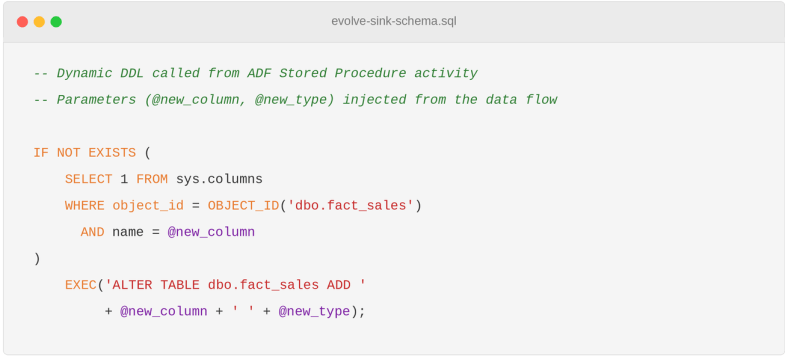
In production, wrap this in try/catch with a Synapse-aware retry (CCI tables can reject ALTERs), validate inferred types against an allowlist, and only auto-ALTER on staging. Production fact-table changes route through human approval, since downstream Power BI models often have implicit column-type assumptions an ALTER will silently break.
Why this works
Additive changes are the most common drift and almost always safe. Automating ALTER TABLE turns them from an outage into a non-event, while breaking changes remain manual – exactly where human judgment belongs.
Pattern 3: CI/CD Schema Validation in Azure DevOps. Pipeline definitions live in Git. A pre-merge job compares each Mapping Data Flow’s source projection against the most recent successful production schema snapshot, flags new columns, and fails the build on narrowing type changes. One honest limitation: because the snapshot comes from production, not the vendor, CI/CD catches drift on its second occurrence. Layer 2 byName() protects you the first time.
When to Enable Schema Drift Handling in Azure Data Factory: A Decision Framework
Not every ADF pipeline needs the full three-layer design. Cost-benefit varies by source.

Critical rule: Enabling “Allow schema drift” without rewriting expressions to use
byName()with fallbacks gives you the illusion of resilience without the reality. The toggle alone doesn’t protect against silent renames.
Mistakes That Make Schema Drift in Azure Data Factory Worse
Auditing the client’s 14 other ADF pipelines surfaced three anti-patterns. The most common is enabling “Allow schema drift” but leaving hardcoded column names – the toggle does nothing if expressions reference source.column_name. Almost as frequent is treating NULL spikes as data quality issues rather than drift signals; a NULL rise after a vendor release is almost always a rename. The subtle one is versioning data flows but not schema contracts – you cannot reproduce a historical run if the expected schema isn’t versioned alongside the pipeline.
Limits of This Design: What the Three-Layer Pattern Cannot Catch
The three-layer design catches additive, renaming, type-change, and breaking drift – but not semantic drift, where column name and type stay identical and only the meaning of values changes. If a vendor silently switches a sale_amount field from USD to a local currency, every schema check passes and the warehouse fills with technically-correct, business-meaningless numbers. Catching this requires anomaly detection on key metrics, contract testing with the source team, or a data-observability layer downstream.
We also rejected two alternatives: a dedicated schema registry is more rigorous but overkill for a single SaaS source, and Delta Lake on Databricks would have solved the problem elegantly but the client had two years of ADF and Synapse expertise – the right answer is rarely a tool migration for one pain point.
Results: An Azure Data Factory Pipeline That Survives Schema Drift
In the 90 days following the redesign, the drift_audit table logged seven additive source changes absorbed automatically, two narrowing type changes caught at pull-request review, and one breaking change halted cleanly – across the rebuilt pipeline and four others migrated to the same pattern. Mean-time-to-detect dropped from days to minutes (audit insert → Logic-Apps alert → on-call email and Teams). The downstream data analytics services built on this pipeline now see drift events as logged data points, not 3 AM page alerts.
Conclusion: Drift-Resilience Is a Design Decision, Not a Code Fix
Eliminate 3 AM alerts, prevent silent NULL spikes, and ensure stakeholders never wake up to inaccurate Monday reports again. The patterns are simple individually – byName() access, “Allow schema drift” toggles, metadata-driven contracts, CI/CD validation. The discipline is committing to all of them at once, because each closes a gap the others can’t.
If your source is controlled by another team or vendor, assume drift. The most expensive bug in data engineering isn’t the one that fails loudly – it’s the one that succeeds quietly. If you’re running ADF, Synapse, or Power BI in production and want to know which drift-handling layer fits your source mix, schedule a consultation with ScriptsHub Technologies. We audit existing pipelines, design contract layers when warranted, and tell you when a schema registry or Delta Lake migration is the better call.
Frequently Asked Questions
Q. What is schema drift in Azure Data Factory?
Schema drift in Azure Data Factory is any unannounced change to a source dataset’s structure – added, renamed, retyped, or dropped columns – that the pipeline did not expect. ADF’s “Allow schema drift” toggle only protects when expressions use byName().
Q. Why do my Azure Data Factory pipelines silently fail after a source schema change?
ADF pipelines silently fail after source updates because hardcoded column projections drop renamed columns, defaulting them to NULL. The pipeline reports success while the warehouse corrupts. Fix this by enabling “Allow schema drift” with byName() fallbacks.
Q. What is the difference between schema evolution and schema drift?
Schema drift is the unannounced change itself. Schema evolution is the pipeline’s ability to absorb it – adding new columns, mapping old names to new, or alerting on breaking changes. Drift is the event; evolution is the response.
Q. How do I enable schema drift in ADF Mapping Data Flow?
Toggle “Allow schema drift” on both Source and Sink transformations, switch column references from source.column_name to byName('column_name'), and use rule-based mapping for renames. The toggle alone is not enough – expressions must be drift-tolerant.
Q. Is drift handling worth the effort for internal data sources?
Usually only Layer 2 (Allow schema drift + byName()) is worth it for internal sources with version-pinned releases. The full three-layer design is reserved for third-party SaaS or sources where producer and consumer deploy independently.


