

Quick Summary – What You’ll Take Away
This case study shows why users stare at a spinner and how Server-Sent Events remove the wait entirely. It compares SSE with WebSockets and polling for AI streaming, then walks through a Node.js and Express backend that proxies OpenAI token streams over SSE and a React hook that consumes the stream with fetch() and ReadableStream. It covers the production essentials – cancellation, retry with backoff, and Time-to-First-Token observability – and closes with the before-and-after numbers from a real deployment.
Why Does Streaming AI Responses in React Feel So Hard at First?
If you’re implementing streaming AI responses in React and your app calls an LLM, users may still watch a spinner for eight to twelve seconds before the whole answer appears at once. The problem is almost never your model, your prompt, or your hosting. The problem is that the interface waits for the entire completion before it renders a single character.
Those were the exact symptoms a B2B SaaS support platform brought to our team at ScriptsHub Technologies. Their new AI assistant worked correctly, but it felt broken: every reply landed as one delayed block, and early users assumed the feature had frozen. Nobody was abandoning the product because the answers were wrong – they were leaving because the answers felt slow.
Large language models generate text one token at a time. The first token is usually ready within a few hundred milliseconds; the rest of the delay is simply the model writing the remaining tokens in sequence. An app that blocks on the full response throws away nearly all of that perceived speed. Streaming AI responses in React fixes the feel without touching the model – the same words arrive, but the user watches them build immediately.
What Was Actually Causing the Blank-Screen Wait?
We traced the lag to two compounding issues, and neither one was the model. First, the backend awaited the full chat completion and returned JSON only after generation finished – so an eleven-hundred-token answer meant an eleven-hundred-token wait. Second, even after we set stream: true on the API call, tokens still arrived in the browser as a single burst.
The hidden culprit was the reverse proxy. Nginx was buffering the entire event stream before forwarding it, silently undoing everything streaming was supposed to do. A single missing response header – X-Accel-Buffering: no – was masking the whole effect. The fix was not a rewrite. It was a transport change: push each token from the model to the browser the moment it exists, over a connection no proxy buffers.
What Are Server-Sent Events, and Why Not WebSockets?
Use SSE because LLM output is one-directional: the server pushes tokens to the browser over a single long-lived HTTP connection, so you get streaming without the bidirectional overhead of WebSockets.
Server-Sent Events (SSE) are a web standard, part of the HTML spec, that lets a server push a stream of text to the browser over a single, long-lived HTTP connection. The wire format is plain text and deliberately simple:

For AI response streaming the communication is strictly one-directional: the server pushes tokens to the client and the client never needs to talk back over the same channel. That is precisely what SSE was built for. Here is how it compares to the alternatives.

Why SSE Fits LLM Streaming
SSE is lighter than WebSockets, rides on standard HTTP/2, passes through corporate proxies without a special upgrade handshake, and gives the browser built-in reconnection through the EventSource API. Every major provider – OpenAI, Anthropic, and Google – streams tokens over SSE for exactly these reasons.
An Honest 2026 Caveat
As AI products grow agentic – mid-stream interrupts, tool-call approvals, multi-turn steering – some teams are moving to WebSockets because those need a client-to-server channel SSE cannot provide. For a prompt-in, tokens-out chat, SSE is still the simpler and more proxy-friendly choice.
How Do You Build the Node.js SSE Streaming Backend?
The backend has one job: take the user’s prompt, open a streaming request to the model, and relay each token chunk to the client as an SSE event. It also includes the two production details that fixed our blank-screen bug – the anti-buffering header and disconnect handling.

Why These Headers Matter
Setting Content-Type to text/event-stream and calling res.flushHeaders() tells the browser not to buffer. Each res.write() pushes a token immediately, and the for-await-of loop drains the model stream without holding the full response in memory. The X-Accel-Buffering header is what makes the tokens actually arrive one at a time behind a proxy.
How Do You Consume SSE in a React Component?
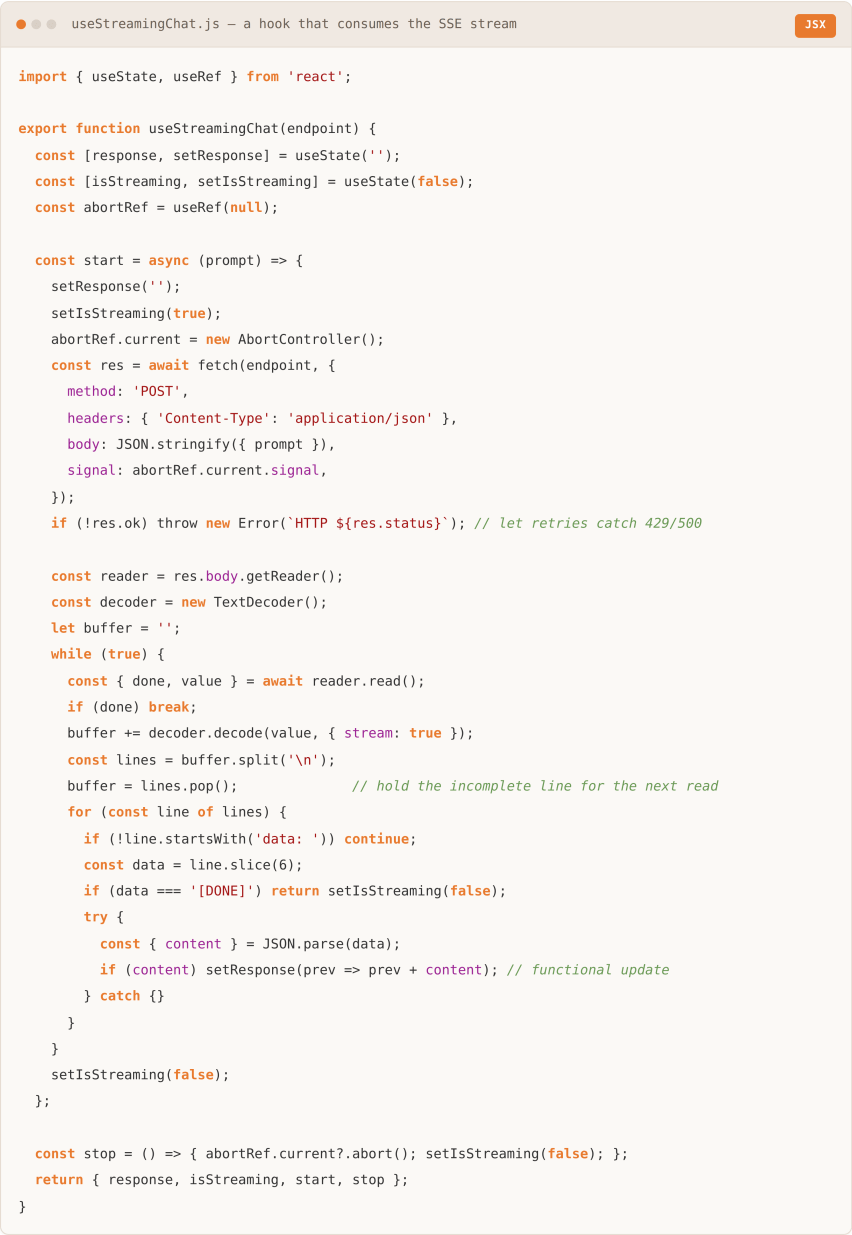
On the React side you have two paths: the browser’s native EventSource API, or fetch() with a ReadableStream reader. Because you need to POST a prompt body, fetch() is the right call – EventSource only supports GET. If you would rather not hand-roll the parsing, the Vercel AI SDK’s useChat hook and libraries like eventsource-parser wrap this fetch-and-parse loop; we build it directly here for full control over cancellation, buffering, and cost.
The React Gotcha: Stale Closures
The trap that breaks most first attempts is reading the streamed text from a state variable inside the async loop, which captures a stale closure and makes each chunk overwrite the last. The hook below avoids it by appending with a functional update – setResponse(prev => prev + token) – which always receives the latest value; a ref works too.
What the Reader Pattern Buys You
A ReadableStream reader gives you byte-level control over incoming SSE data – something EventSource cannot do over POST. The AbortController wired to the fetch signal lets the user cancel mid-generation, which closes the connection and stops token consumption.
EventSource or fetch()?
Use native EventSource only for GET-based endpoints with no request body. Use fetch() + ReadableStream for every AI streaming scenario: you need POST to send the prompt, and fetch gives you the AbortController cancellation that EventSource lacks.
Building a React AI product and want the streaming layer right the first time? ScriptsHub Technologies designs and ships production SSE architectures in React and Node.js. Visit scriptshub.net to start a conversation with our engineering team.
How Did Streaming AI Responses in React Change the Numbers?
The change the support platform cared about was perceived speed, and the streaming rebuild moved it sharply. We measured before and after across their staging suite and the first weeks of production, keeping the same model and prompt so the only variable was the transport.

Why the Numbers Moved
Nothing about generation got faster – the model still writes the same tokens at the same rate. What changed is when the user sees the first one. Moving Time to First Token from roughly nine seconds to under half a second is the entire difference between a feature that feels frozen and one that feels alive.
How Do You Handle Errors, Retries, and Cancellation?
Cancel with an AbortController, retry transient errors with exponential backoff, and preserve partial output when the connection drops.
A production stream has to survive three failure modes: network interruptions mid-stream, model API errors such as rate limits, and client-side disconnects. The backend sends structured error events instead of breaking the stream, and the frontend retries transient failures with exponential backoff.

Why the Disconnect Cleanup Matters
Detecting req.on(‘close’) on the backend is the part most teams miss: when a user navigates away, the HTTP connection closes but the model stream keeps running and billing unless you explicitly abort it. Exponential backoff on the client absorbs transient network blips without hammering the server during an outage.
Avoid the Streaming Race Condition
When a user sends a new prompt mid-stream, abort the in-flight request first: store the AbortController in a ref and call it before starting the next one, or old tokens bleed into the new answer. Keeping streaming state in a single object – content, status, and error updated together – prevents the out-of-sync UI that scattered useState calls cause.
What Are the Production Steps for Streaming AI Responses in React?
Three steps separate a working prototype from something you can run under real traffic: cap your token spend, batch your renders, and measure the metric that actually reflects the experience.
1. Token budgeting – prevent runaway cost

2. Buffered rendering – avoid per-token re-renders
The hook above updates state on every token to keep the example simple. Under production load, calling setState on each token re-renders an ever-growing response string, and that cost compounds as the answer lengthens – so batch the tokens and flush once per animation frame instead.

3. Observability – measure TTFT and throughput
Time to First Token (TTFT) is the metric that mirrors how fast the app feels. Track it next to tokens-per-second so you catch model slowdowns before users complain.

Putting it together, here is the full request lifecycle for a streaming AI response in production.


Conclusion: SSE Is the Default for AI Streaming in React
Streaming AI responses in React comes down to a well-understood pattern, not a trick. The ChatGPT typing effect users now expect from every AI product is just this: stream tokens from the model, relay them over Server-Sent Events, and append each chunk to React state. The implementation is simpler than most teams expect – set stream: true and relay each delta, consume it with fetch() and ReadableStream so you can POST the prompt, wire an AbortController for cancellation, buffer state updates with requestAnimationFrame, and track TTFT in production. For the support platform we worked with, that sequence turned a feature that felt frozen into one that felt instant, without changing a single line of the model call.
ScriptsHub Technologies builds production React, Node.js, and cloud AI systems for teams in the US, UK, and India. If you’re adding LLM features and want the streaming, cost-control, and observability layers done right, visit scriptshub.net and tell us what you’re building.
Frequently Asked Questions
Q. Why isn’t my React state updating as the AI response streams in?
Because reading state inside the stream loop captures a stale closure, so each chunk overwrites the last. Fix it with a functional update – setResponse(prev => prev + token) – or accumulate the text in a ref.
Q. Why do my SSE tokens arrive all at once instead of streaming?
Usually a proxy is buffering the response. Set X-Accel-Buffering: no on the SSE response and disable buffering for the route in nginx so each token is forwarded the moment it is written.
Q. Can you use the browser EventSource API to stream from an LLM?
No. EventSource only supports GET requests, and LLM calls need a POST body for the prompt. Use the Fetch API with a ReadableStream reader instead – the pattern every browser LLM client uses.
Q. Should I use the Vercel AI SDK or build SSE streaming myself?
Use the Vercel AI SDK’s useChat hook for speed; it wraps the fetch-and-parse loop. Build it yourself when you need full control over cancellation, token budgeting, buffering, and observability, or want to avoid the dependency.
Q. What is Time to First Token, and why does it matter?
Time to First Token (TTFT) is how long until the first character appears. It mirrors how fast the app feels far better than total generation time, so it is the key UX metric for streaming AI.
Q. When should you use WebSockets instead of SSE for AI streaming?
Use WebSockets when the same session needs bidirectional communication – mid-stream interrupts, tool-call approvals, or collaborative editing. For a single user receiving streamed output, SSE is simpler and more reliable.


