

Quick summary
Queries through the SQL Server linked server took minutes; natively on the IBM i, seconds. The cause was four-part naming, which let the optimizer pull far more of the file across the wire than the query needed, then filter locally, and OPENQUERY pass-through moved that work back onto the IBM i. Two settings cost us time:
collation compatibleis false by default, so character comparisons run locally, andremote proc transaction promotiondoes not stop MSDTC on linked server DML despite the common advice. We also cached before tuning the query path and hit a ceiling.
Why didn’t caching fix the AS/400 latency?
We started where most teams start when AS/400 database performance becomes visible to users, because it ships fastest without touching the legacy system: a cache in the .NET backend.
It worked, up to a point. Status codes and warehouse lists stopped being fetched on every request. But the ceiling arrived fast: cold starts still paid full latency, expiry handed one unlucky user the original wait, and open orders could not be cached at all.
A cache changes how often you pay a cost, not how large the cost is.
Why is a SQL Server linked server slow when the IBM i itself is fast?
The diagnosis came from a comparison we run on every hybrid estate: the same query twice, once natively on the IBM i and once through the AS/400 linked server. Native returned in seconds. The remote path took over a minute. The cause was four-part naming:

SQL Server query optimization depends on statistics, and there are none for ORDHDR, so the optimizer cannot tell whether that filter returns twelve rows or a million. Faced with that uncertainty it frequently picks the plan it treats as safest: pull far more of the file across the network than the query needs, then filter locally. How much crosses depends on the provider and the predicate, so confirm it in the plan.

Figure 1: where the work happens in each execution path.
Microsoft documents an analogous case for its own OLE DB Provider for DB2: a four-part name with a WHERE clause runs slowly, and OPENQUERY is the workaround. One caveat. The mechanism there is the provider dropping the WHERE clause while fetching schema information; ours is missing remote statistics on MSDASQL over the IBM i Access driver. Same symptom and fix, different cause.
The AS/400 was never slow. It was being asked to hand over far more than the query needed so another machine could filter it.
How does OPENQUERY fix four-part naming performance?
We rewrote the read paths with OPENQUERY, which sends the statement to the IBM i verbatim so filtering and trimming happen before anything crosses the network.
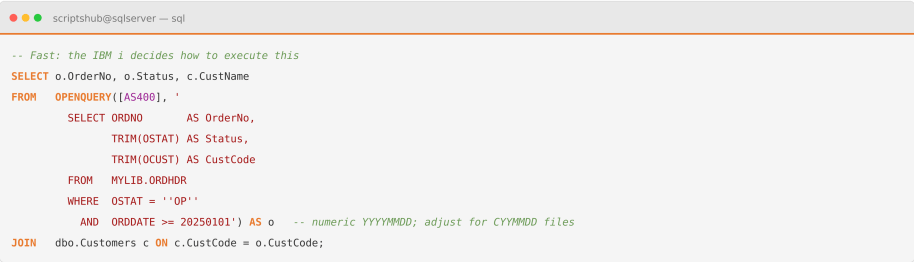
OPENQUERY removes the optimizer’s discretion. The IBM i receives a self-contained statement, uses its own indexes, and returns only the result set. Moving TRIM to the Db2 side mattered too: legacy CHAR columns arrive space-padded, and trimming locally means paying to transfer the padding first.
When to use which: OPENQUERY performance depends on the predicate being known up front, so dynamic shapes need sp_executesql.

Table 1: choosing between the four access patterns to an IBM i.
Why are writes through a linked server slower than reads?
Reads improved sharply. Writes barely moved, and it took a while to see why: distributed query performance breaks down differently once data changes rather than merely moves.
An UPDATE or DELETE against a four-part name was being executed row by row on our data: SQL Server fetched candidates, then issued one remote statement per row. A few thousand rows became a few thousand round trips. That is not guaranteed behavior, since the plan depends on provider capabilities and statement shape, so read the plan rather than assume it.
Transactions made it worse, and here we corrected an assumption that costs many teams time. Microsoft’s documentation on distributed transactions is specific. Inside an explicit or implicit transaction, update operations are only allowed against providers that support ITransactionJoin, and SQL Server calls it automatically to enroll the remote server in a distributed transaction. ITransactionLocal is the autocommit case; a provider supporting only that cannot take part in updates inside a transaction at all. You cannot switch the enlistment off, and the much-cited remote proc transaction promotion option applies to remote procedure calls, not distributed queries. Plan for SET XACT_ABORT ON too, which the same reference ties to update operations in a distributed transaction.
What actually fixed writes: Two structural changes. Set-based pass-through with UPDATE OPENQUERY(...) collapses thousands of round trips into one statement. High-volume CRUD then moved off the link entirely, with our .NET services reaching Db2 for i over a pooled ODBC connection. That left the link doing what it is genuinely good at: reporting reads and cross-database joins.
Is a legacy integration slowing a modern application? We work across the stack this touches: Microsoft data platforms, data engineering, and the application layer on top. We re-architect hybrid SQL Server and IBM i estates without a big-bang migration. Tell us what your slowest screen is doing.
Which linked server options change performance, and which are noise?
Test this outside production first. These options take effect on new connections, and collation name changes which rows a character predicate returns, so a wrong value gives different results rather than an error. Six server options matter; the rest of the SSMS Server Options page rarely does. Most tuning advice stops at the query, but one of these options decides whether our write path runs at all, and another is the commonest misconfiguration we find.
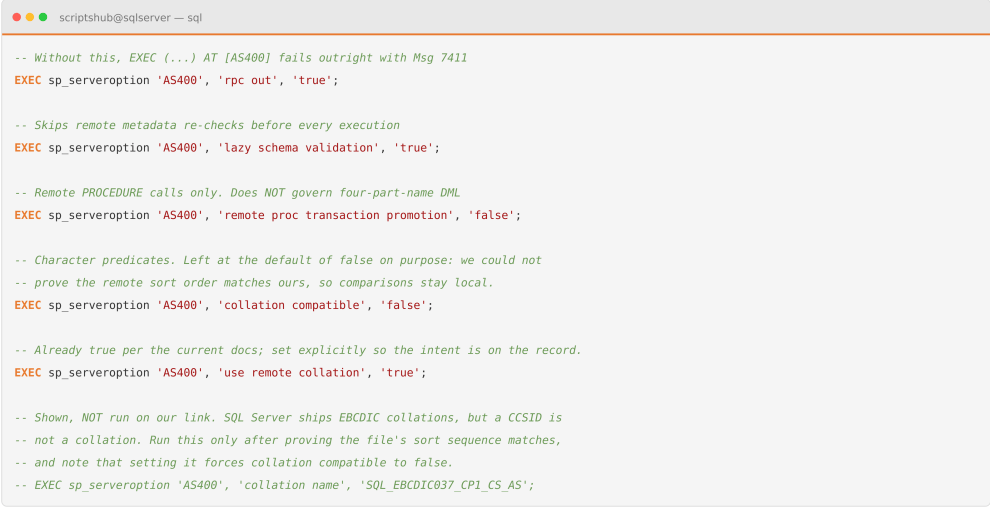

Table 2: Linked server options and their defaults. Microsoft’s current sp_serveroption page gives use remote collation a default of true; the older Linked Server Properties page says false. Verify sys.servers.uses_remote_collation on your own instance rather than trusting either.
Why collation is the one to check first: Left at its default, SQL Server evaluates every character-column comparison locally. Our opening example filters on OSTAT = 'OP', a CHAR column, so that default helped drag the file across the wire. Microsoft’s OLE DB provider guidance is that non-SQL-Server sources need the collation declared.
The AS/400 caveat: setting collation compatible to true is unsafe here, since it assumes the remote sort order matches your local one. A CCSID is a character encoding, not a collation, and Db2 for i ordering also depends on the job’s sort sequence. SQL Server ships EBCDIC collations, but treat any mapping as something to prove per file rather than assume. If you assert a match you do not actually have, the queries come back with the wrong rows.
None of this matters if the provider is wrong to begin with, and the provider is a parameter of sp_addlinkedserver rather than something you change later. Ours runs ODBC over the IBM i Access driver with the provider’s Allow inprocess option enabled, under Server Objects, Linked Servers, Providers, MSDASQL, or the AllowInProcess registry value. Out-of-process marshalling copies every row, so in-process is materially faster. State the trade-off, though: a fault inside a provider running in-process can take the SQL Server process down with it.

Which IBM i ODBC settings actually change performance?
The IBM i Access driver exposes more than seventy connection string keywords, and most advice on ODBC performance tuning lists ones already at their optimal defaults. We traced ours against IBM’s documented defaults first.

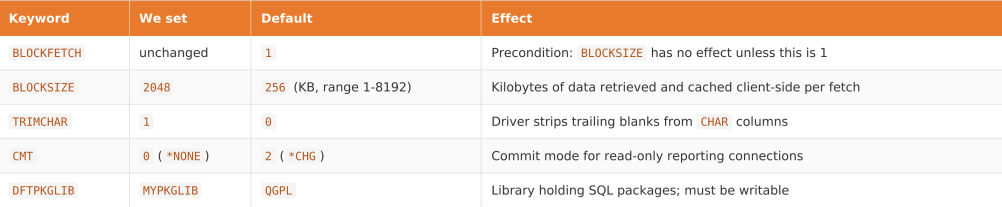
Table 3: IBM i Access ODBC keywords we changed, compared against the driver defaults.
BLOCKSIZE is worth raising when you return large result sets. It sets how many kilobytes the driver caches per fetch, and IBM’s guidance on record blocking explains the mechanism. Note the precondition: BLOCKSIZE has no effect unless BLOCKFETCH is 1. On attribution, the package library fix and connection pooling below almost certainly did more for us than block size did. Raising it from a 256 KB default is a smaller change than most tuning advice implies.
Two keywords we did not change: COMPRESSION already defaults to 1, so setting it is decoration. XDYNAMIC defaults to on too, which is why package caching looked enabled while delivering nothing. The real defect was DFTPKGLIB pointing at a library the service account could not write to, so package creation failed silently and statements were re-prepared.
We ended up maintaining two connection strings. Reporting connections use CMT=0 and a large block size; transactional connections keep a real commit mode. We also enabled ODBC pooling, since a fresh QZDASOINIT job per request dominated short queries.
Which Db2 for i indexes did we add, and which did we skip?
We nearly skipped this step, assuming the network was the bottleneck. It was not. The legacy files were designed for RPG keyed access, not for the WHERE clauses a modern application generates, and no amount of network tuning fixes a missing index. Db2 for i ships the tooling to prove it: Visual Explain shows a statement’s access plan, the SQL Plan Cache holds what actually ran, and the Index Advisor recommends indexes from executed queries. IBM’s Redbook on SQL performance analysis covers the methodology.
Our process on the Db2 side:
- Ran every slow statement through Visual Explain. A table scan on a multi-million-row file was usually the culprit.
- Built only the Index Advisor recommendations backing hot predicates, since indexes that speed reads slow writes. Build them outside business hours: creating an index over a multi-million-row physical file is an expensive operation on a live system.
- Fixed data type mismatches. A .NET parameter sent as
NVARCHARagainst a Db2CHARcolumn forces an implicit conversion that disables the index. - Removed functions from indexed columns in
WHEREclauses.
How should you layer caching over the AS/400?
With the query path fast, we rebuilt the cache segmented by volatility rather than convenience.

Table 4: Cache strategy and TTL by data volatility tier.
We added stampede protection too. The original cache had a flaw that appeared only under load: a cold key fired dozens of simultaneous queries.
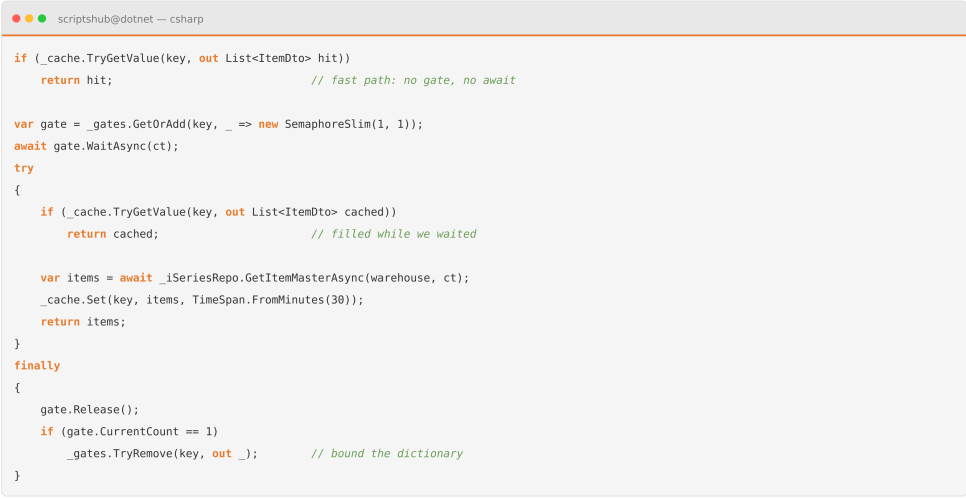
On a cold key, one thread pays the AS/400 round trip and the rest wait milliseconds for the filled entry. Warm reads never touch the gate at all. Without it, a cold cache under traffic produces a thundering herd slower than no cache at all. The TryRemove bounds _gates, but it is not airtight: a thread that has already fetched a gate from the dictionary but not yet awaited it can be left holding an orphan while another thread creates a replacement, so a rare double-fetch is possible under heavy key churn. It degrades rather than corrupts. If that matters, keep the gates and let a size-bounded cache evict them instead. One further rule: every write invalidates its keys, or you trade latency for stale data.
What did each fix actually deliver?
Ranked by effort against risk, the changes compared as follows.

Table 5: What each change did, in the order we applied them. These are qualitative outcomes, not measurements. We have not published timing figures for this engagement, and the ranges you see in vendor tuning articles are not ours to borrow.
Caching over an untuned query just moves the cost to the next eviction, which is why we would reverse this order next time.
Conclusion
Almost none of the latency originated on the AS/400 itself. It accumulated between the two databases: an optimizer guessing blind, a transaction coordinator nobody asked for, a driver whose package library silently failed, and access plans with no index to use.
Fix the execution path first, then cache what is left, and a SQL Server linked server stops being the reason a modern product feels slow.
If a hybrid SQL Server and IBM i estate is holding your application back, our engineering team can review your query paths and find where the time goes. Talk to us about SQL Server and IBM i integration.
Frequently asked questions
Q. What is a linked server in SQL Server?
A SQL Server linked server is a configured connection that lets the Database Engine run distributed queries against an outside data source, such as an IBM i, Oracle or another instance, from one T-SQL statement.
Q. How do I add a linked server in SQL Server?
Use sp_addlinkedserver with a provider and data source, then sp_addlinkedsrvlogin for credentials. Enable rpc out afterwards if you will call remote procedures. Our data engineering services cover the full setup.
Q. How to query a linked server in SQL Server?
Two ways: a four-part name, or OPENQUERY pass-through. Four-part naming lets the local optimizer plan the query; OPENQUERY sends it to the remote server, usually faster on large tables. More engineering write-ups are on our blog.
Q. Does disabling remote proc transaction promotion stop MSDTC on linked server updates?
No. That option governs remote stored procedure calls only. Inside a transaction, SQL Server enrolls the linked server through ITransactionJoin automatically and you cannot disable it. Use SET XACT_ABORT ON for update operations.
Q. Why does EXEC at a linked server fail with Msg 7411?
Because rpc out is false by default. Set it with sp_serveroption before using EXEC (...) AT. It governs outbound procedure calls; the separate rpc option governs inbound ones.


