

QUICK SUMMARY –
OneLake shortcuts are pointers that make external storage readable inside Microsoft Fabric without moving a byte, the fastest way to remove duplicate copies of analytical data. In the scenario below, teams go from five copies of the same tables to one, cutting a nightly pipeline from roughly 55 minutes to about nine and replacing a 22-minute import with Direct Lake framing. What protects the result is Delta file hygiene and knowing V-Order is now off by default in new Fabric workspaces.
If your team keeps three versions of the same fact table, your refresh window has crept past an hour, and two dashboards disagree on a metric, OneLake shortcuts can reduce copy sprawl rather than forcing you to solve the problem in DAX. The scenario below is a composite, assembled from patterns across enrollment analytics estates rather than one client.
What Are OneLake Shortcuts and Why Do They Matter for Analytics?
OneLake is the single, tenant-wide data lake that ships with Microsoft Fabric, one per tenant, much as every Microsoft 365 tenant gets one OneDrive. Built on Azure Data Lake Storage Gen2, it supports a subset of the ADLS Gen2 and Blob APIs, so most tools that already talk to a data lake can talk to it.
A shortcut is an object inside that lake pointing at another storage location. Microsoft’s OneLake shortcuts documentation describes them as a way to unify data across domains, clouds and accounts, with permissions managed centrally so each Fabric workload no longer needs its own connection to each source.
Two decisions separate OneLake from a conventional lake. One storage layer serves many engines – Spark notebooks, Warehouse T-SQL, Dataflows Gen2, KQL and Power BI Direct Lake all read the same files – and one open format, because every Fabric engine persists tables as Delta Lake over Parquet. A table a notebook writes at 02:00 is usually queryable in T-SQL within a minute. The result is a single namespace for all analytical data, the property copy sprawl destroys.

One storage layer, many engines. Shortcuts extend the same namespace to storage outside Fabric.
Why Do Analytics Teams End Up With Five Copies of the Same Table?
Copies accumulate because each solves a real problem when it is created: a tool that cannot read the previous format, a permissions boundary, a performance fix. Nobody designs a five-copy estate. Picture a mid-sized enrollment analytics team with tens of gigabytes of data, a single-digit number of core tables, several dozen report pages, and leadership opening dashboards first thing.
Raw extracts land in an Azure data lake overnight. A staging database is loaded from them nightly, a curated star schema lives in a second database, and the semantic model imports that schema into memory. The data science group keeps a fifth copy in its own storage account, because their notebooks cannot reach the reporting database.

The before state: five copies, five schedules, five owners, one contested definition of an inquiry.
Each copy carries its own schedule, owner and quiet definition of an inquiry. The nightly chain runs about 55 minutes, and when step three fails, morning dashboards show yesterday’s numbers. Two teams report lead counts differing by three to four percent, costing a day of analyst effort monthly.
Copy sprawl accumulates rather than gets designed. Teams fighting a Power BI slow refresh add a copy, and it stays.
How Does a Shortcut Remove a Duplicate Copy?
Shortcuts in OneLake appear in a lakehouse as ordinary folders, but the bytes stay where they live, and any engine with OneLake access reads through them.
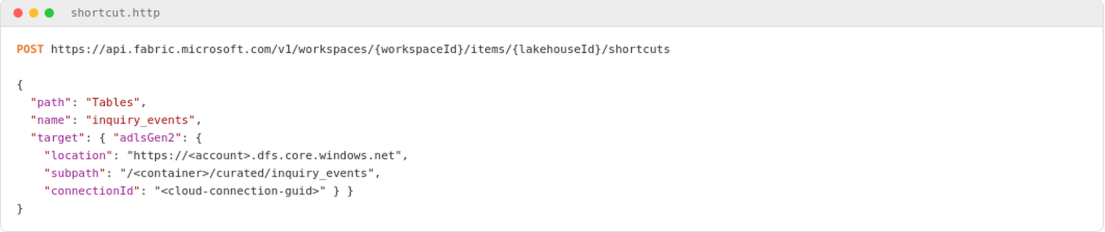
Creating an ADLS Gen2 shortcut through the Fabric REST API. connectionId is required, and subpath must include the container. No bytes move: the folder simply appears inside the lakehouse.
WHY THIS WORKS. Shortcuts behave like symbolic links. Deleting one leaves the target untouched, though deleting a file inside a shortcut does delete it at the target. Nothing is copied, so duplicate data copies stop accumulating and there is no reconciliation gap. Synchronization is automatic, including schema updates, which also means upstream changes arrive unannounced – so the same schema-drift defenses you would build in Azure Data Factory belong downstream.
In this scenario, copies one and five go on day one: the raw lake zone and the data science storage account are both shortcut into a single Fabric workspace, with no pipeline rewritten and no bytes moved.
Targets run from other Fabric items to ADLS Gen2, S3, Google Cloud Storage, Dataverse, SharePoint and Iceberg, with on-premises sources reachable through the Fabric on-premises data gateway – the option teams miss before deciding a legacy source must be copied. Cross-cloud reads incur egress, offset by workspace-level caching for S3, GCS and gateway shortcuts but not ADLS Gen2. Our companion post covers configuring OneLake shortcuts by source type.
How Do You Migrate a Semantic Model to Direct Lake on OneLake?
Migrating a semantic model to Direct Lake takes six steps: shortcut the raw zone, rebuild the transformation layer as a medallion architecture, write gold as V-Ordered Delta, convert the model, push calculated columns upstream, then schedule OPTIMIZE and VACUUM. The remaining three copies go this way – bronze reads through the shortcut, silver applies conformance, gold takes the shape reports already expect.

The migration workflow. Nothing is cut over until the gold layer is proven.
Converting the model surfaces the real constraint. Direct Lake doesn’t support calculated columns over Direct Lake tables, and calculated tables can’t reference them either. A model like this typically carries a dozen or more, and most of them are ruled out. They move upstream into the gold layer, under the discipline that governs Power BI DAX optimization. A static date table built with CALENDAR() is the exception: it references nothing in Direct Lake, so it stays.
The detail that catches most teams is V-Order. Microsoft’s Delta Lake optimization guidance now states it is disabled by default for newly created workspaces, which default to a write-heavy Spark profile. Older tutorials still reference spark.sql.parquet.vorder.enable, removed in runtime 1.3 and later. Read-heavy reporting needs it switched back on.
[[VERIFY-FRICTION]] This one cost us most of a day the first time we hit it. The team wrote the gold tables before setting the session config, so the first Direct Lake test performed no faster than the import model. The files were present and the model was correct, but the Parquet files lacked V-Order. Running OPTIMIZE ... VORDER over the existing tables fixed it, but only after we had been through the semantic model three times looking for a modeling mistake that was never there.

Two notebook cells: PySpark enables V-Order for read-heavy gold tables, then a %%sql cell compacts and vacuums after each incremental load.
Before you run this. VACUUM permanently deletes files and limits time travel to the retention window; 168 hours is the seven-day default. Run it in a non-production workspace first and confirm no concurrent readers or writers are active. The .mode("overwrite") above replaces table contents, so check you are writing the table you think you are.
WHY THIS WORKS. Direct Lake has no import step. It reads V-Ordered Parquet column segments straight from OneLake on demand, so a refresh becomes framing – a metadata operation completing in seconds regardless of table size. Microsoft’s cross-workload maintenance guidance attributes a 40 to 60 percent cold-cache improvement to V-Order.
OPTIMIZEruns in a notebook, not the SQL analytics endpoint.
When to use which. The flavor of Direct Lake you pick changes your failure mode, and this is where advice circulating online is often wrong: missing V-Order does not itself force a fallback to DirectQuery. Per Microsoft’s explanation of how Direct Lake works, Direct Lake on SQL endpoints fall back when guardrails are exceeded or SQL-layer security is detected, while Direct Lake on OneLake cannot fall back at all – refresh simply fails until the Delta tables are optimized back within limits.
What Changes When Four Copies Become One?
Consolidating four copies into one changes three things: the pipeline stops waiting on hops it no longer needs, storage drops to what a single modeled copy requires, and the semantic model refresh becomes a metadata operation instead of an import.

Representative outcomes from a composite scenario. Composite figures, illustrative of the pattern rather than a single measured deployment, and they will vary with data volume, capacity SKU and model design.

The same representative outcomes shown as a comparison. Every figure appears in Figure 6.
How to verify it worked. Confirm which Direct Lake flavor your model uses before trusting any diagnostic, watch refresh history for guardrail warnings after a week, count the Parquet files behind each gold table, and reconcile one metric against the legacy report.
If your estate has copies you cannot account for, an outside pass usually pays for itself. Our data engineering and cloud analytics services team runs fixed-scope OneLake readiness assessments across the US, UK and India: we map every copy, flag models that will breach Direct Lake guardrails, and size the work first.
OneLake Shortcuts vs Mirroring vs a Copy: Which Should You Use?
OneLake shortcuts are not always the right answer. This is the same class of decision as choosing storage modes in a Power BI composite model: the comparison that matters is shortcuts vs mirroring vs an honest copy.
Shortcuts fit when data already sits in an analytics-grade store someone else owns. Database and open mirroring suit operational systems, replicating rows into OneLake continuously with no ETL pipeline to build; that replica is a real copy, free to one terabyte per capacity unit. Metadata mirroring is the exception – for sources such as Azure Databricks Unity Catalog, Fabric syncs only catalog structure and reads through shortcuts, so no copy exists. A genuine copy still earns its place for a slow API or fragile legacy system.

Choosing between a shortcut, mirroring and a genuine copy, by who owns the source.
What Are the Most Common Shortcut Mistakes to Avoid?
Three mistakes account for most of the trouble we unwind. The first is pointing Direct Lake at bronze tables, which are wide and fragmented; model gold and point the semantic model there. The second is skipping OPTIMIZE and VACUUM, because small frequent writes leave thousands of tiny Parquet files and query time degrades until a guardrail breaks.
The third is migrating everything at once. Run the legacy chain in parallel for a full reporting cycle, as in an SSRS to Power BI migration. Executive trust is harder to rebuild than a pipeline.
One governance point outlasts the migration. The Delta Lake transaction log gives ACID transactions across Fabric engines, so concurrent writes are safe – but safe is not coordinated, and a table written by two teams still needs one named owner. Permissions deserve the same care: pass-through evaluates each user’s identity against the target, while delegated identity uses a fixed credential, so users see the intersection of its access and their own. Treat shortcut security as a Microsoft data platform decision.
Conclusion
OneLake does not make data engineering easy. WIt removes several categories of avoidable work: data copies, reconciliations, 3 a.m. failures, and meetings about which number is correct. The technical win is a faster pipeline. The organizational win is two teams no longer arguing about lead counts, because only one set of bytes remains.
Work with ScriptsHub Technologies
We design and modernize data platforms and Power BI estates across the US, UK, and India. Our work spans OneLake architecture and semantic model tuning.
Tell us where your copies are hiding: contact ScriptsHub Technologies.
OneLake Shortcuts FAQ
Q. What is the difference between OneLake shortcuts and mirroring?
Shortcuts point at data that stays in its source. Database mirroring replicates rows into OneLake as a managed copy. Metadata mirroring, used for Unity Catalog, syncs only catalog structure. It reads data through shortcuts.
Q. Do OneLake shortcuts copy data?
No. Shortcuts reference data in place across Azure, AWS, and Google Cloud without copying bytes. They often provide the fastest route to value in a Fabric migration.
Q. Do OneLake shortcuts inherit permissions from the source?
No. With pass-through, the default, each user’s own identity is evaluated against the target. Delegated shortcuts instead use a fixed connection identity, and users see the intersection of that identity’s access and their own.
Q. Are OneLake shortcuts a replacement for Azure Data Lake Storage Gen2?
No. OneLake runs on ADLS Gen2 and supports a subset of its APIs. Microsoft Fabric provisions and governs the environment, so you do not manage an individual storage account.
Q. Do OneLake shortcuts work with Power BI Direct Lake semantic models?
Yes, provided the model reads V-Ordered Delta tables in the gold layer. Point Direct Lake at modeled gold tables rather than raw bronze data arriving through a shortcut.


