

Quick Summary:
If you keep one report copy per customer and every schema change becomes an N-way deployment, you are paying a maintenance tax that Power BI row-level security removes. A B2B SaaS client ran over 200 duplicated reports. Our team at ScriptsHub Technologies replaced them with one shared semantic model, an authoritative entitlement table, and a single dynamic role driven by
USERPRINCIPALNAME(). Maintenance fell from roughly 14 analyst hours a week to under two, and onboarding a customer from a half-day report clone to a 30-minute entitlement insert.
Why Does Multi-Tenant Power BI Reporting Break Down at Scale?
If your BI team clones a report template every time sales closes a deal, if one column rename triggers a deployment across dozens of files, and if two analysts spend half their week reconciling copies, the problem is not report design. It is the isolation model. Our team at ScriptsHub Technologies saw exactly this on a B2B SaaS engagement running over 200 reports, where Power BI row-level security provided a scalable approach to multi-tenant reporting.
Duplication feels safe because isolation is physical: separate files cannot leak into each other. The cost arrives later. Every schema change multiplies by the customer count, drift creeps between copies meant to be identical, and nobody can answer who sees which rows without opening them all.
What Is Power BI Row-Level Security and How Does It Work?
Power BI row-level security is the model-level access control that restricts which rows of a semantic model a user sees, using DAX filter expressions defined inside roles and evaluated at query time. The filter returns TRUE or FALSE per row; failing rows are removed, not hidden.
Two details decide whether it holds across tenants. Power BI permissions come first: per Microsoft Fabric row-level security documentation, filters apply only to Viewer users, while Power BI workspace roles of Admin, Member and Contributor keep edit rights and are never filtered. And it governs rows, not columns: anyone seeing a row sees every column on it, which makes withholding a metric a job for object-level security.
The model audit confirmed three preconditions. Every fact table reached a TenantId key. Customer organizations mapped to three Power BI user roles (admin, analyst and viewer) with different KPI visibility. And Microsoft Entra ID gave a stable user principal name.
Static or Dynamic RLS: Which Fits a Multi-Tenant Dataset?

Static roles would have meant a named definition per tenant, plus a membership edit per joiner. Microsoft’s RLS design guidance is explicit that efficient row-level security comes down to model design. Power BI dynamic row-level security matched a SaaS platform with steady churn, which is why Microsoft treats it as the default: one role definition filtering differently for each user through a mapping table.
How Do You Build the Entitlement Table That Drives Dynamic RLS?
Access starts with a table mapping each identity to the tenants it may see. It is the single source of truth, and what auditors read.
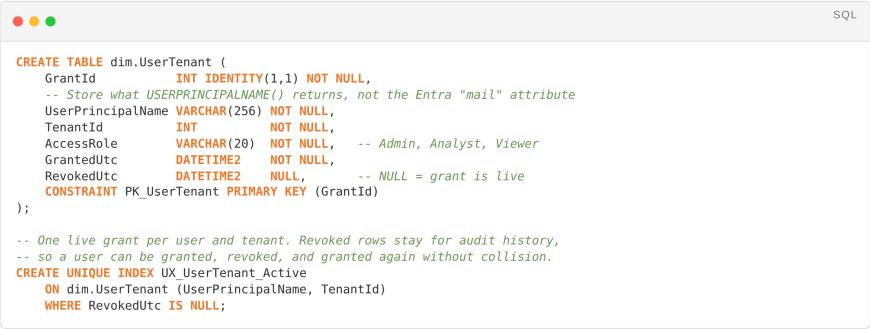
Why the surrogate key matters: The table imports with no relationship to the facts, so it never filters anything by accident. It exists only to be read by the role expression. Keeping
RevokedUtcnullable rather than deleting rows preserves an access history the security review can trace. A surrogate key with a filtered unique index makes that work: history accumulates, while the index still guarantees one live grant per user and tenant.
Building RLS on email addresses is the common shortcut, and where rollouts quietly fail. The value USERPRINCIPALNAME() returns is a sign-in identifier, not reliably an email: aliases diverge, and guests resolve to a tenant-qualified form. Populate from the UPN and verify with a card visual before go-live. That removes the most common cause of “the customer sees nothing”. We refresh the map every 5 minutes; as that feed is an upstream contract, it got the same Azure Data Factory schema drift protections as any production pipeline.
How Do You Write the Power BI Row-Level Security DAX Filter?
Dynamic row-level security using USERPRINCIPALNAME() in Power BI needs one placement decision: the role filter goes on the tenant dimension, not the fact tables.

What the engine actually does:
CALCULATETABLEresolves the signed-in user’s tenant keys once, andINreduces to an integer set-membership test the storage engine handles natively. Becausedim.Tenantsits on the one-side of every fact relationship, one filter propagates to Sales, Usage and Billing without being evaluated against millions of rows.
Role-aware KPI visibility sits outside row-level security, deliberately. A measure reading the user’s access grade can drive conditional formatting, but that is presentation logic. Where a metric genuinely had to be withheld from analyst and viewer personas, we used object-level security.

The role filter sits on the tenant dimension and propagates outward. Shared dimensions sit off that path, which is where leakage starts.
Filter the dimension whenever a conformed tenant key exists. Replicating it across every fact makes the storage engine apply the predicate to your largest tables on every query, instead of resolving it once against a small dimension and letting relationships carry it outward. That is the usual explanation for overhead above 15%. Filter a fact directly only when no relationship path exists. USERPRINCIPALNAME() also behaves differently under embedding, and USERELATIONSHIP() can throw errors once roles are active. Pair this with Power BI DAX optimization.
How Do You Prevent Cross-Tenant Leakage Through Shared Dimensions?
Fact tables are rarely where row-level security leaks. Shared dimensions are: a product catalog or global user table sits outside the tenant relationship path, so the filter never reaches it and every tenant sees every row.
Where a shared dimension is reachable through a fact, Apply security filter in both directions on that relationship extends filtering up the join, so the dimension surfaces only rows the tenant’s facts reference. This is a hard product limit, not a tuning choice: where a table takes part in multiple bidirectional relationships, Microsoft lets you select it on only one of them. Several shared dimensions means designing around that constraint, not testing past it. It carries a query cost, so load-test first. Where no relationship path exists, the dimension needs its own filter, or it does not belong in the shared model.
Getting this wrong rarely surfaces until an audit. Rather than find yours in production, our Microsoft data platform team designs and reviews Power BI row-level security models end to end.
How Do You Set Up and Publish RLS Roles in Power BI?
Roles are authored in Power BI Desktop and membership assigned in the Power BI Service; skipping either leaves the model unsecured. Both Import and DirectQuery models support RLS, including cross-cloud sources like AWS Athena. Analysis Services live connections differ, because the filters live externally.


Worth knowing: Microsoft 365 groups cannot be added to an RLS role. Only Entra security groups, distribution groups and mail-enabled groups are supported. Guidance telling you to add a Microsoft 365 group fails quietly, and its members simply see no rows.
How Do You Test RLS Roles Before Go-Live?
Four validation passes ran before cutover. We exercised every persona across three tenants and confirmed each saw only entitled rows. We traced queries in DAX Studio to confirm the filter resolved in the storage engine, not the formula engine. We audited dimensions for rows crossing boundaries. And we ran a 10,000-query workload with and without roles, measuring roughly 6% added latency, inside the SLA and consistent with the Power BI optimization guide and with Power BI semantic model performance norms.
The failure modes matter more than the happy path. Remove a user from the mapping table and confirm the next request returns an empty visual, not stale rows. Then seed a double-grant and confirm the union resolves without either tenant leaking into the other. One caveat: Test as role runs under your own identity, so validate customer and external B2B guest identity by signing in as them.
Power BI Embedded changes the identity picture. In app-owns-data embedding the end user never authenticates to Power BI at all. Unless you pass an EffectiveIdentity when generating the embed token, USERPRINCIPALNAME() resolves to the service principal rather than your customer, and a model that tests clean in the Service returns nothing once embedded.
What Results Did the Power BI Row-Level Security Rollout Deliver?
The client retired every duplicate report but one, keeping a single shared dataset behind a tenant-aware embed. Maintenance dropped from roughly 14 analyst hours per week to under two. A schema change that once occupied a deployment window now reaches every customer at once. RLS latency settled around 6% above baseline on this model. Treat that as one data point, not a benchmark: your overhead tracks model size, cardinality and filter placement. Step 8 covers what to check if you land higher. The model passed an external security review before cutover, in an engagement that ran a few weeks.
How to Implement Row-Level Security in Power BI: Our 8-Step Workflow
These are the row-level security best practices our team runs on every multi-tenant build.
Step 1: Inventory tenant-scoped tables. Confirm every fact reaches a tenant key and list the dimensions that do not. Those are the leakage candidates.
Step 2: Build the entitlement table. Map identities to tenant grants, populate from the UPN not the mail attribute, and keep revocations as rows.
Step 3: Filter the dimension, not the facts. One RLS role on the tenant dimension propagates through relationships; replicating it across facts is the most common cause of avoidable overhead.
Step 4: Handle shared dimensions explicitly. Enable bidirectional security filtering on the one relationship that needs it, or give the dimension its own filter.
Step 5: Constrain workspace permissions. Power BI security fails open here: tenant users must sit at Viewer, since anything higher bypasses filters.
Step 6: Refresh RLS entitlements on a tight schedule. 5 to 15 minutes is the practical default; slower refreshes let revoked users keep access longer than policy claims.
Step 7: Test personas and failure modes. Cover every role across three or more tenants, verify revocation and double-grant behavior, then validate Power BI Embedded and guest access.
Step 8: Measure the overhead. Baseline a representative query set with and without RLS, not a single visual. Without it you cannot separate RLS cost from model cost.
Conclusion
Row-level security collapses the maintenance burden of multi-tenant reporting from N to one. A single dataset, an authoritative access map and one dynamic role replace per-customer cloning, and access becomes auditable in a way a folder of near-identical files is not.
Working through a multi-tenant Power BI model? We design the entitlement architecture, implement the roles, and validate the model against security review before cutover. Book a review with ScriptsHub Technologies.
FAQ
Q. Should I enable Power BI row-level security?
Yes, whenever one semantic model serves audiences that must not see each other’s rows. Skip it only if every consumer is entitled to every row, or if isolation already happens upstream.
Q. How to test row-level security in Power BI?
Use View as in Power BI Desktop before publishing, then Test as role on the Security page in the Service. Both run under your own identity, so verify guest access by signing in as that account.
Q. How to turn off row-level security in Power BI?
Delete the roles under Manage roles in Power BI Desktop and republish. Removing members is not the same thing: with roles still defined, unassigned viewers see no rows at all.
Q. What is row-level security?
Row-level security restricts which rows each user can see. You define the rule as a DAX filter inside a role, and the engine applies it to every query, so rows outside the grant never reach the report.
Q. What is row-level security in simple words?
Everyone opens the same report and sees a different slice of it. One dataset filtered per person by who signed in, instead of a separate report copy for every audience.
Q. How to apply row-level security?
Author a role in Power BI Desktop under Modeling, then Manage roles, write a DAX filter, publish the model, then add members to that role under Security in the Power BI Service.


