

Quick Summary:
A client’s Synapse Spark job was truncating and reloading a telemetry table of hundreds of millions of rows on a multi-hour cadence, saturating the source database and pinning the Spark pool. Our team replaced the full reload with a watermark-plus-MERGE design: capture a bounded change window, push the predicate down to the source, and upsert into Delta Lake. Runtime fell from roughly 80 minutes to under 10, and source CPU during the read window dropped from about 70% to single digits.
Why Is My Azure Synapse Spark Job Reloading the Entire Table?
If your Spark pool pins at 90% during every ingestion window and source CPU spikes on a schedule, incremental data loading can eliminate unnecessary full-table reloads. The job is almost certainly reloading the whole table instead of the change delta. Those were the symptoms our team at ScriptsHub Technologies found on a recent engagement.
The pipeline ingested telemetry readings into a curated Delta table for Power BI reporting downstream. The table grew by millions of rows a day, yet every run reloaded all of it on a multi-hour cadence, blocking analytical workloads. A Spark pool tier upgrade was on the table – which would have made the symptom cheaper to tolerate, not fixed the shape of the workload.

The watermark and MERGE pattern: the upper bound is captured before the read, and the watermark advances only after the MERGE commits.
What Is Incremental Data Loading in Azure Synapse Analytics?
Incremental data loading means reading and writing only the rows that changed since the last successful run. A high-water-mark column defines the change boundary, and a MERGE statement applies inserts and updates idempotently to the target table. An Azure Synapse incremental load built this way touches only the change delta on each run instead of rewriting the whole table.
Our team started with the Spark history server and a sample of source-to-target row diffs. Barely 0.1% of source rows changed in a typical window, so the job moved roughly a thousand times more data than it needed to.
Three preconditions must hold. The source had a reliable LastModifiedUtc column with a supporting index. The target was already a Delta table, so atomic upserts were available. Consumers accepted near-real-time freshness over point-in-time snapshots. All three checked out.
Which Change-Detection Strategy Should You Use?
Use a high-water-mark column when the source has a trustworthy modified timestamp, and CDC when you must capture hard deletes.

When to use which: the telemetry table was append-heavy with rare updates and no hard deletes, so the high-water-mark route was cheapest and its indexed timestamp made source queries fast. CDC would have required source DDL changes the client wanted to avoid.
How Do You Build an Incremental Load in Synapse with PySpark?
The PySpark implementation has three parts: a watermark store, a JDBC bounded read, and an idempotent upsert. The watermark store lives in the curated zone as a small Delta control table holding the last successfully processed value per source table.

Why this works: the control table lives in the same storage account as the target, so the watermark and the data it describes share a failure domain. The existence check matters on day one:
load()on a missing path raises rather than returning an empty frame, so without it the sentinel is never reached and the first run fails instead of doing a full load.
Next, capture the upper bound before reading, then read a bounded window. This is the step most implementations skip, and it is the one that causes silent data loss.
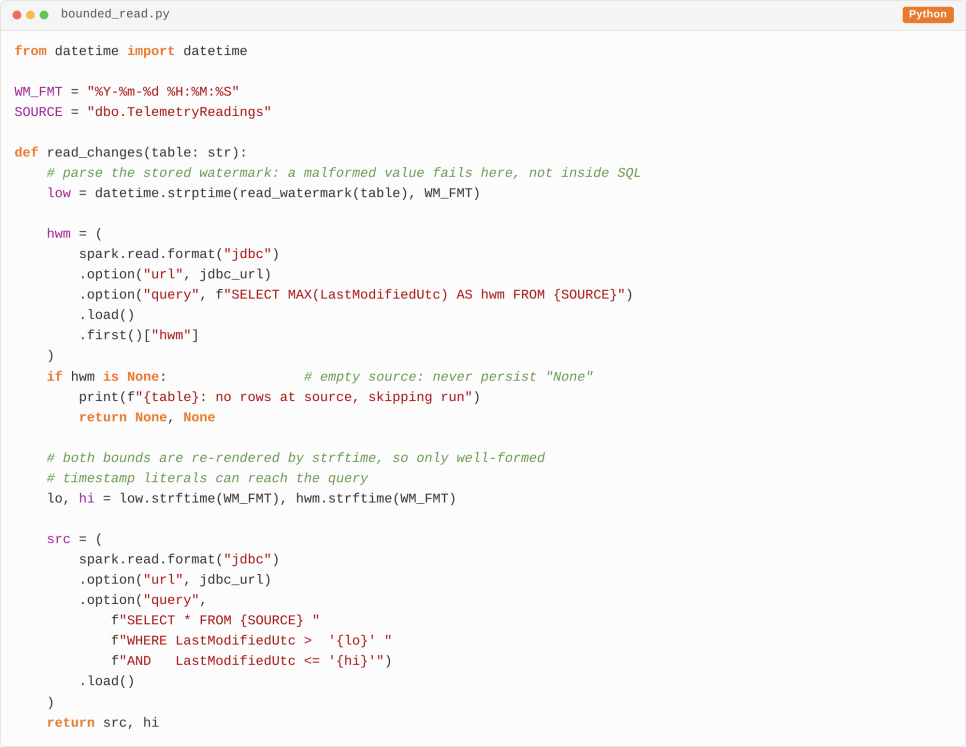
What this guarantees: the predicate is pushed into the source query, so the index is used and the resulting PySpark DataFrame holds only changed rows. The closed upper bound means rows arriving mid-read are picked up by the next run, not skipped. Both bounds are parsed then re-rendered by
strftime, so a tampered control-table value cannot reach the query as SQL. The empty-source guard matters too: without it a null maximum persists as the string"None", and the next run fails on parse. Thelowbound is refined by the lookback buffer below.
Delta Lake’s MERGE INTO applies the batch idempotently – re-running the same window produces the same target state.

How to verify it worked: check the numTargetRowsInserted and numTargetRowsUpdated metrics in the Delta history against the source row count for that window. If inserts plus updates do not equal the rows read, your match keys are wrong. The Delta Lake merge documentation covers the semantics in full, and Microsoft’s Apache Spark in Azure Synapse overview explains how pool sizing affects runtime.
If your Synapse pipelines read far more than they write, our data engineering services team can profile the workload and scope the redesign. Start a conversation at scriptshub.net/contact-us.
How Do You Handle Late-Arriving Transactions?
Subtract a lookback buffer from the lower bound, because a transaction that commits after the watermark passes carries an earlier timestamp and would otherwise be skipped permanently. Size the overlap to the longest source transaction.

Why the overlap is free: the overlap re-reads a few processed rows, and because MERGE matches on primary keys, replaying them rewrites identical values. Idempotency makes the overlap cost-free – without it, the buffer would create duplicates.
How Do You Validate the Pattern Before Production?
Replay real source data into a non-production workspace and reconcile row counts and column-level checksums against a parallel full-reload run. Over seven days of replay, counts matched every run and hash totals on three critical columns matched exactly – the same discipline behind cross-system data reconciliation.
We then exercised three failure paths. Killing the job mid-MERGE left the target unchanged and the watermark unadvanced, so the next run replayed the window without duplication. Two days offline produced one catch-up batch. A far-future timestamp loaded, but the watermark advanced only to the captured upper bound. Tested failure paths, not benchmarks, earn sign-off.
What Did the Redesign Actually Deliver?
Runtime fell from roughly 80 minutes to under 10 per run, close to a 90% reduction, and held once in production. Source CPU during the read window dropped from about 70% into single digits. Spark pool utilization fell from 90% to the low twenties. The tier upgrade was shelved and monthly Synapse compute spend fell by a material double-digit percentage. Incremental data loading became their default pattern for new pipelines.
Should the Pipeline Layer Run the Load Instead?
Use the pipeline layer for plain table-to-table copies, and a Spark notebook when the load needs transformation or Delta MERGE semantics. Azure Synapse Pipelines share the Data Factory engine, where Microsoft documents the same watermark chain: a Lookup activity reads the stored watermark, a second reads the source maximum, a Copy activity moves rows between those bounds, and a Stored Procedure writes it back.
Choose the pipeline route for table-to-table copies across sources, or where the connector supports native change data capture, which captures deletes without a watermark column. Mapping Data Flows add an incremental extract toggle that tracks the watermark for you, though its incremental extract checkpoint binds to pipeline and activity names – rename either and tracking resets. Setting an explicit Checkpoint key on the activity decouples tracking from those names and removes the risk. Choose the Spark route, as we did, when a load needs transformation, Delta MERGE semantics, or a lookback buffer the Copy activity cannot express. For ADLS Gen2 files, select on last-modified time or time-partitioned folders. If the target is a Dedicated SQL Pool rather than Delta Lake, land the window in a staging table and MERGE on the key – generally available there since version 10.0.17829.0.
The Six-Step Workflow Our Team Runs
1. Profile the workload. Compare rows transferred against rows changed. A ratio above 5:1 makes the table a strong incremental data loading candidate; above 100:1, urgent.
2. Confirm source readiness. Check a reliable modified timestamp, CDC, or change tracking exists, the column is indexed, and keys are stable.
3. Implement the watermark, bounded read, and MERGE. Keep the control table metadata-driven so a single parameterized notebook serves every source table, instead of cloning a pipeline per table.
4. Add a backstop. If change history expired beyond the watermark, fall back to a full refresh rather than dropping changes – the same fail-loud principle that governs schema drift in Azure Data Factory.
5. Reconcile weekly. Compare source and target counts and hash totals on critical columns, catching drift early.
6. Right-size compute. Once the baseline holds, tier down the Spark pool; the saving counts toward return.
Does This Pattern Still Apply If We Move to Microsoft Fabric?
Yes – the pattern ports to Fabric with only configuration changes. Microsoft has announced no end-of-life date for Azure Synapse Analytics, but new investment is concentrated on migration to Microsoft Fabric. The watermark control table, bounded read, and Delta MERGE carry over to Fabric Spark and OneLake – storage paths move, the logic does not. Designing incremental data loading correctly today makes migration a plumbing exercise, as our OneLake shortcuts walkthrough shows.
Conclusion
Incremental data loading is a change to the shape of the workload, not just to the code. Reading 0.1% of a table instead of all of it removes most of the runtime, source contention, and compute cost at once. The design effort is measured in days; the payoff compounds for years.
If your Synapse Spark job reads more than five times what it writes, an incremental redesign returns more than scaling the pool. Our team designs, builds, and validates these pipelines end to end. Reach out at scriptshub.net/contact-us or follow us on LinkedIn.
Frequently Asked Questions
Q. What is a watermark table in incremental data loading?
A watermark table is a small control table storing the last successfully processed timestamp or ID per source table. Each run reads it, loads only rows beyond that value, and updates it after a successful commit.
Q. Incremental data load vs full load: which should I use?
Use incremental data loading when daily change volume is under 20% of total rows, the source has reliable change detection, and consumers accept near-real-time freshness over point-in-time snapshots.
Q. Does Delta Lake MERGE handle deletes from the source?
Only if your source surfaces deletes, typically through CDC or change tracking. A timestamp-based watermark cannot detect hard deletes, because a deleted row leaves no timestamp behind to read.
Q. How do I stop the watermark from advancing past unprocessed rows?
Capture the source maximum before the read, not after, and use that captured value as both the read upper bound and the new watermark. Subtract a lookback buffer to catch late-committing transactions.
Q. What happens if my Spark job fails mid-MERGE?
A Delta MERGE commits as one atomic transaction, so a mid-run failure leaves the target unchanged. Because the watermark advances only after a successful commit, the next run replays the same window safely.


